

Business Technology Consulting
Quick and Easy Search Engine Optimization (SEO)
Introduction
While Search Engine Optimization (SEO) campaigns can consume considerable resources, there are
several simple steps that everyone can take to improve their Website’s organic ranking.
Things You'll Need
Instructions
(1) FIRST STEP: CHANGE YOUR THINKING
Many people regard Search Engine Optimization (SEO) as something you do to a Website after it has
been created. However, many of the recommendations that follow could easily be described as best
practices for Website content, links and pages.
In fact, many of the factors that Google and other search engines use to determine page rank came from
fields very different from search engine technology. For example, screen readers for the blind look for
picture descriptions designated by an ALT tag. So by adding ALT descriptions to all of your Website
images, you are improving the handicapped accessibility of your Website, in addition to improving your
search engine ranking.
So, the first step in simplifying SEO is to change your thinking from optimizing an existing Website, to
creating an optimized Website from the ground up by following simple best practice rules for Website
content, links and pages. And then, continue following these rules as content is updated and as your
Website evolves over time.
(2) SUPPLY PICTURE NAMES AND PICTURE DESCRIPTIONS
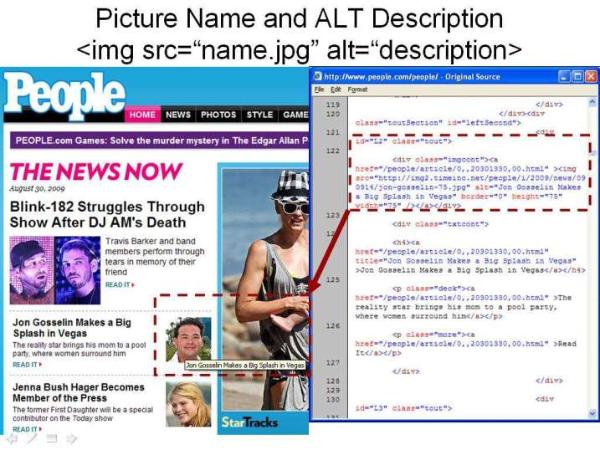
By using appropriate and descriptive file names for your Website images along with using good Alt text,
you can provide search engines with more information about the content of pages on your Website and
improve your organic ranking. For example naming a picture "coke-bottle-ring-CBR12.jpg" is better than
just "CBR12.jpg" for the picture name. Also, whenever possible include descriptive ALT text of the
images used on a Website (e.g. "Amy Artist in her Workshop" versus just "Amy").
This Google Webmaster Help article "Image publishing guidelines" describes Google's guidelines for
using and publishing images, including the role of picture names and Alt text.
(3) CREATE PAGE TITLES AND PAGE DESCRIPTIONS
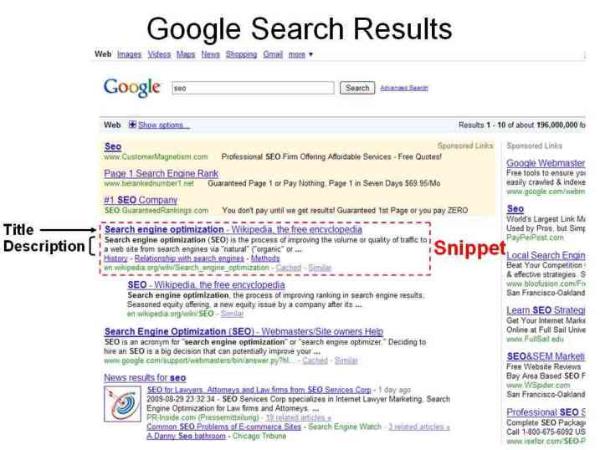
By making use of TITLE and DESCRIPTION Meta tags, Webmasters can influence the content of the title
and summary (a.k.a. Snippet) that is used for their Website page in Google Search Results. These tags
also give Webmasters another opportunity to include keywords that reinforce the theme of a Web page's
content.
The Google Webmaster Help article "Site title and description" (Google: answer=35624) describes how
to change a Website page Title and Description and consequently the search results snippet.
(4) REMEMBER: "TEXT IS BEST FOR CONTENT AND LINKS"
Rich media content (such as Flash, Silverlight and videos) is becoming more popular on Websites
everywhere. However, search engines can have difficulty finding and interpreting text and links
embedded in rich media, meaning that your Website may not get credit for this content and your organic
ranking will suffer. Most search engine robots are much more effective at crawling and indexing Website
text than rich media content and they can have difficulty navigating dynamically generated web pages or
deciphering page links contained in rich media content.
The Google Webmaster Help article "Flash and other rich media files" (Google: answer=72746) provides
suggestions for reducing the negative impact of using Flash and other rich media files on your Website.
(5) USE KEYWORDS IN YOUR DOMAIN NAME AND PAGE LINKS
Search Engines prefer a Website URL structure that is as simple as possible, and one that is intelligible
to human beings (i.e. with readable words). So when choosing a domain name attempt to incorporate
words that describe the purpose of your business. For example, a business that does printing would
benefit from a domain name that incorporates the word "print". Also, a Web page URL that ends with
about-us, products, company, services, or product-support will be more favorably regarded than a Web
page URL that ends with page1, id2, node3 or x4yz. Furthermore, consider using punctuation to
separate words in your URLs, some search engines prefer hyphens "-" to underscores "_" (for example
use: "red-coat" instead of "redcoat" or "red_coat").
In addition to the benefit in search engine ranking, by using keywords in your URL structure, you will
make it possible for users to type in your domain name or Web page URL from memory and more easily
create links to your Website content. The Google Webmaster Help article "URL structure" (Google:
answer=76329) has several tips on improving a Website's URL structure.
(6) THE NOT SO QUICK OR EASY SEARCH ENGINE OPTIMIZATION
Search engine rankings can be influenced by more than a hundred individual factors, and the factors
used along with their relative weighting can change (and often do change) from one day to the next but, it
is widely recognized that two factorsalways figure prominently in determining page rank:
1. High Quality/Unique/Fresh Content
2. Inbound Links from "reputable" Websites
Please note that the quality of inbound links (determined by a Website's reputation) is far more important
than the quantity of inbound links (see Google Webmaster Help article "Ranking" [Google:
answer=34432]). When Website A has a link to content on Website B, Website A is in effect using (or
risking) its reputation to endorse Website B. Conversely, note that by having a link in your Website to a
page on another Website you are using your Website's "reputation" to endorse the content on the page
where your link is directed. Although the definition of a "reputable" Website will vary by source, popular
media outlets such as The New York Times and The Washington Post are generally regarded to be
highly reputable Websites.
While creating high quality unique content that is updated frequently will require a considerable
commitment of resources, you will reap benefits that include more frequent visits from users and a
higher probability that others will want to place links on their Website to your content, in addition to
improving search engine rankings (see Google Webmaster Help article "Little or no original content"
[Google: answer=66361]). The other long-term high resource commitment to search engine ranking is
to establish relationships (and page links) with other like-minded Webmasters and their relevantly
themed Websites. Obviously linking to direct competitors is not something that anyone would
recommend, yet links to or from Websites not relevant to your users will most likely not be used and
would provide only questionable benefit to your search engine rankings. Needless to say, a link building
campaign will not be quick or easy.
(7) NEXT STEPS
If you feel like you are ready for a more advanced exploration of Search Engine Optimization, a good
resource to start with is "Google's Search Engine Optimization Starter Guide" document which can be
downloaded from the Google Webmaster Help article "Search Engine Optimization (SEO)" (Google:
answer=35291).
The Google Webmaster Help articles "Webmaster guidelines" (Google: answer=35769) and "Google-
friendly sites" (Google: answer=40349) are also excellent references.
Tips
If you have Internet Explorer, you can view Meta Tags and the other coding of online Web pages by
selecting the "View Source" option from the "Page" menu.
Warnings
Google and the other search engines actively look for what they deem to be unethical practices intended
to unduly influence a Website's Page Rank. Google's Webmaster Guidelines lists several of the
practices that they consider to be unethical.
Even if the Search Engines are not looking for it, anything intended to trick the search engines is also
being dishonest to your users, the same people you are asking to buy something or believe something.
So like your mother would say: "Don't do it!"
Resources
(1) "Image publishing guidelines" Google Webmaster Tools Help Article
(2) "Site title and description" Google Webmaster Tools Help Article
(3) "Flash and other rich media files" Google Webmaster Tools Help Article
(4) "URL structure" Google Webmaster Tools Help Article
(5) "(Website) Ranking" Google Webmaster Tools Help Article
(6) "Little or no original content" Google Webmaster Tools Help Article
(7) "Search Engine Optimization (SEO)" Google Webmaster Tools Help Article
(8) "Webmaster guidelines" Google Webmaster Tools Help Article
(9) "Google-friendly sites" Google Webmaster Tools Help Article
NOTE: This article was originally published on eHow as "Quick and Easy Search Engine Optimization
(SEO)" in 2009.
© 2009 -2012 Business Technology Consulting
Introduction
While Search Engine Optimization (SEO) campaigns can consume considerable resources, there are
several simple steps that everyone can take to improve their Website’s organic ranking.
Things You'll Need
- Website
- Way to edit the Website
Instructions
(1) FIRST STEP: CHANGE YOUR THINKING
Many people regard Search Engine Optimization (SEO) as something you do to a Website after it has
been created. However, many of the recommendations that follow could easily be described as best
practices for Website content, links and pages.
In fact, many of the factors that Google and other search engines use to determine page rank came from
fields very different from search engine technology. For example, screen readers for the blind look for
picture descriptions designated by an ALT tag. So by adding ALT descriptions to all of your Website
images, you are improving the handicapped accessibility of your Website, in addition to improving your
search engine ranking.
So, the first step in simplifying SEO is to change your thinking from optimizing an existing Website, to
creating an optimized Website from the ground up by following simple best practice rules for Website
content, links and pages. And then, continue following these rules as content is updated and as your
Website evolves over time.
(2) SUPPLY PICTURE NAMES AND PICTURE DESCRIPTIONS
By using appropriate and descriptive file names for your Website images along with using good Alt text,
you can provide search engines with more information about the content of pages on your Website and
improve your organic ranking. For example naming a picture "coke-bottle-ring-CBR12.jpg" is better than
just "CBR12.jpg" for the picture name. Also, whenever possible include descriptive ALT text of the
images used on a Website (e.g. "Amy Artist in her Workshop" versus just "Amy").
This Google Webmaster Help article "Image publishing guidelines" describes Google's guidelines for
using and publishing images, including the role of picture names and Alt text.
(3) CREATE PAGE TITLES AND PAGE DESCRIPTIONS
By making use of TITLE and DESCRIPTION Meta tags, Webmasters can influence the content of the title
and summary (a.k.a. Snippet) that is used for their Website page in Google Search Results. These tags
also give Webmasters another opportunity to include keywords that reinforce the theme of a Web page's
content.
The Google Webmaster Help article "Site title and description" (Google: answer=35624) describes how
to change a Website page Title and Description and consequently the search results snippet.
(4) REMEMBER: "TEXT IS BEST FOR CONTENT AND LINKS"
Rich media content (such as Flash, Silverlight and videos) is becoming more popular on Websites
everywhere. However, search engines can have difficulty finding and interpreting text and links
embedded in rich media, meaning that your Website may not get credit for this content and your organic
ranking will suffer. Most search engine robots are much more effective at crawling and indexing Website
text than rich media content and they can have difficulty navigating dynamically generated web pages or
deciphering page links contained in rich media content.
The Google Webmaster Help article "Flash and other rich media files" (Google: answer=72746) provides
suggestions for reducing the negative impact of using Flash and other rich media files on your Website.
(5) USE KEYWORDS IN YOUR DOMAIN NAME AND PAGE LINKS
Search Engines prefer a Website URL structure that is as simple as possible, and one that is intelligible
to human beings (i.e. with readable words). So when choosing a domain name attempt to incorporate
words that describe the purpose of your business. For example, a business that does printing would
benefit from a domain name that incorporates the word "print". Also, a Web page URL that ends with
about-us, products, company, services, or product-support will be more favorably regarded than a Web
page URL that ends with page1, id2, node3 or x4yz. Furthermore, consider using punctuation to
separate words in your URLs, some search engines prefer hyphens "-" to underscores "_" (for example
use: "red-coat" instead of "redcoat" or "red_coat").
In addition to the benefit in search engine ranking, by using keywords in your URL structure, you will
make it possible for users to type in your domain name or Web page URL from memory and more easily
create links to your Website content. The Google Webmaster Help article "URL structure" (Google:
answer=76329) has several tips on improving a Website's URL structure.
(6) THE NOT SO QUICK OR EASY SEARCH ENGINE OPTIMIZATION
Search engine rankings can be influenced by more than a hundred individual factors, and the factors
used along with their relative weighting can change (and often do change) from one day to the next but, it
is widely recognized that two factorsalways figure prominently in determining page rank:
1. High Quality/Unique/Fresh Content
2. Inbound Links from "reputable" Websites
Please note that the quality of inbound links (determined by a Website's reputation) is far more important
than the quantity of inbound links (see Google Webmaster Help article "Ranking" [Google:
answer=34432]). When Website A has a link to content on Website B, Website A is in effect using (or
risking) its reputation to endorse Website B. Conversely, note that by having a link in your Website to a
page on another Website you are using your Website's "reputation" to endorse the content on the page
where your link is directed. Although the definition of a "reputable" Website will vary by source, popular
media outlets such as The New York Times and The Washington Post are generally regarded to be
highly reputable Websites.
While creating high quality unique content that is updated frequently will require a considerable
commitment of resources, you will reap benefits that include more frequent visits from users and a
higher probability that others will want to place links on their Website to your content, in addition to
improving search engine rankings (see Google Webmaster Help article "Little or no original content"
[Google: answer=66361]). The other long-term high resource commitment to search engine ranking is
to establish relationships (and page links) with other like-minded Webmasters and their relevantly
themed Websites. Obviously linking to direct competitors is not something that anyone would
recommend, yet links to or from Websites not relevant to your users will most likely not be used and
would provide only questionable benefit to your search engine rankings. Needless to say, a link building
campaign will not be quick or easy.
(7) NEXT STEPS
If you feel like you are ready for a more advanced exploration of Search Engine Optimization, a good
resource to start with is "Google's Search Engine Optimization Starter Guide" document which can be
downloaded from the Google Webmaster Help article "Search Engine Optimization (SEO)" (Google:
answer=35291).
The Google Webmaster Help articles "Webmaster guidelines" (Google: answer=35769) and "Google-
friendly sites" (Google: answer=40349) are also excellent references.
Tips
If you have Internet Explorer, you can view Meta Tags and the other coding of online Web pages by
selecting the "View Source" option from the "Page" menu.
Warnings
Google and the other search engines actively look for what they deem to be unethical practices intended
to unduly influence a Website's Page Rank. Google's Webmaster Guidelines lists several of the
practices that they consider to be unethical.
Even if the Search Engines are not looking for it, anything intended to trick the search engines is also
being dishonest to your users, the same people you are asking to buy something or believe something.
So like your mother would say: "Don't do it!"
Resources
(1) "Image publishing guidelines" Google Webmaster Tools Help Article
(2) "Site title and description" Google Webmaster Tools Help Article
(3) "Flash and other rich media files" Google Webmaster Tools Help Article
(4) "URL structure" Google Webmaster Tools Help Article
(5) "(Website) Ranking" Google Webmaster Tools Help Article
(6) "Little or no original content" Google Webmaster Tools Help Article
(7) "Search Engine Optimization (SEO)" Google Webmaster Tools Help Article
(8) "Webmaster guidelines" Google Webmaster Tools Help Article
(9) "Google-friendly sites" Google Webmaster Tools Help Article
NOTE: This article was originally published on eHow as "Quick and Easy Search Engine Optimization
(SEO)" in 2009.
© 2009 -2012 Business Technology Consulting
 |
| |
 |
| |
 |
| |
 |